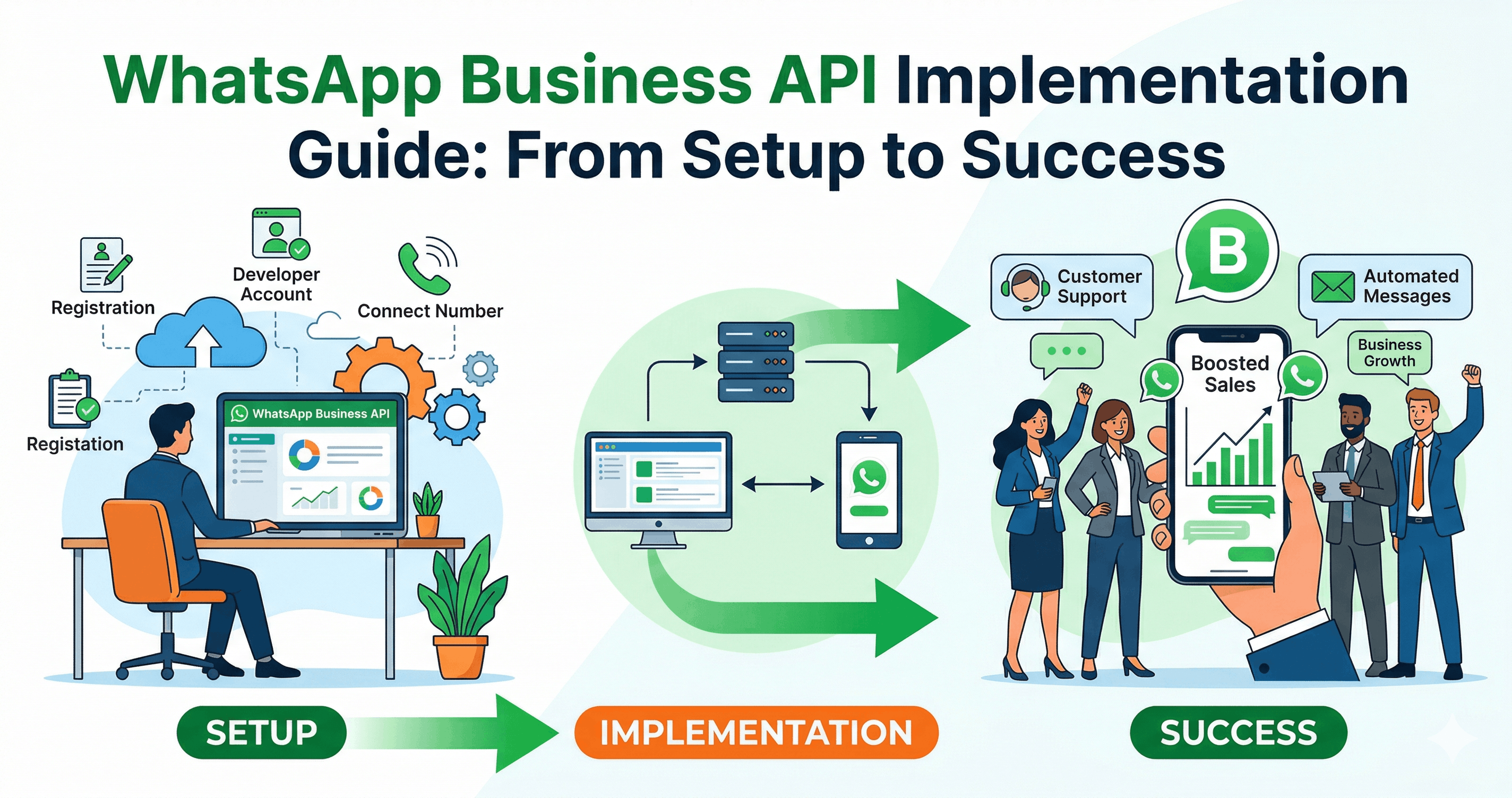
What is WhatsApp Business API?
The WhatsApp Business API is a robust communication solution designed specifically for medium and large businesses. Unlike the standard WhatsApp Business app, the API allows companies to automate messages, integrate with CRM systems, manage large-scale conversations, and provide seamless customer support. It enables businesses to send notifications, updates, alerts, and personalized messages directly to customers in a secure and reliable environment.
Why WhatsApp API is Important for Business Growth
The importance of WhatsApp API lies in its ability to create direct, real-time communication channels with customers. Unlike emails or SMS, WhatsApp messages have significantly higher open and response rates. This means businesses can reach their customers instantly and effectively.
One of the biggest advantages is customer trust. Since WhatsApp uses end-to-end encryption, customers feel more secure interacting with businesses on this platform. Additionally, verified business accounts increase credibility, helping brands stand out in a competitive market.
Another key benefit is automation. With WhatsApp API, businesses can automate repetitive tasks such as sending order confirmations, appointment reminders, payment alerts, and customer support responses. This not only saves time but also improves operational efficiency.
Key Features of WhatsApp API Integration
WhatsApp API integration offers a wide range of features that help businesses streamline communication and enhance customer experience:
Automated Messaging: Send instant replies, away messages, and notifications without manual intervention.
Chatbots Integration: Use AI-powered chatbots to handle customer queries 24/7.
CRM Integration: Connect WhatsApp with your CRM to manage customer data efficiently.
Rich Media Support: Share images, videos, documents, and interactive buttons.
Multi-Agent Support: Allow multiple team members to handle customer conversations simultaneously.
Analytics and Insights: Track message performance, response rates, and customer engagement.
These features collectively help businesses deliver faster, smarter, and more personalized communication.
Step-by-Step WhatsApp API Integration Process
Integrating WhatsApp API into your business may seem complex, but with the right approach, it becomes manageable and highly rewarding.
1. Define Your Business Goals
Before starting the integration, it is important to clearly define your objectives. Are you looking to improve customer support, increase sales, or automate notifications? Having clear goals will help you design a better strategy.
2. Choose a WhatsApp Business Solution Provider
Since WhatsApp API is not directly accessible to all businesses, you need to work with an official Business Solution Provider (BSP). These providers help with setup, hosting, and ongoing support.
3. Verify Your Business
Business verification is a crucial step. You need to submit your business details and get approval to access the API. Once verified, you can apply for a green tick (official business account badge), which boosts customer trust.
4. Set Up API Infrastructure
This involves configuring servers, integrating APIs, and ensuring secure communication channels. Many BSPs offer cloud-based solutions, making this process easier for businesses without technical expertise.
5. Integrate with CRM and Tools
To maximize efficiency, integrate WhatsApp API with your existing CRM, helpdesk, or marketing tools. This allows you to manage all customer interactions from a single platform.
6. Create Message Templates
WhatsApp requires businesses to use pre-approved message templates for outbound communication. These templates are used for sending notifications, alerts, and updates.
7. Test and Launch
Before going live, thoroughly test the system to ensure everything works smoothly. Once testing is complete, you can launch your WhatsApp communication strategy.
Best Practices for Successful WhatsApp API Integration
To get the most out of WhatsApp API, businesses should follow these best practices:
Obtain Customer Consent: Always get user permission before sending messages.
Personalize Messages: Use customer data to create meaningful and relevant conversations.
Avoid Spam: Do not send excessive or irrelevant messages.
Use Automation Wisely: Combine automation with human support for better results.
Monitor Performance: Continuously track and improve your communication strategy.
Following these practices ensures a positive user experience and long-term engagement.
Use Cases of WhatsApp API in Business
WhatsApp API can be used across various industries and business functions:
Customer Support
Provide instant support through automated replies and live chat. Resolve queries faster and improve customer satisfaction.
Marketing Campaigns
Send personalized offers, promotions, and updates directly to customers’ phones. This increases engagement and conversion rates.
Order Updates and Notifications
Keep customers informed about order status, delivery updates, and payment confirmations.
Lead Generation and Sales
Engage potential customers with interactive messages and guide them through the sales funnel.
Appointment Reminders
Reduce no-shows by sending timely reminders for appointments and bookings.
Challenges in WhatsApp API Integration
While WhatsApp API offers numerous benefits, businesses may face some challenges during implementation:
Approval Process: Business verification and template approval can take time.
Technical Setup: Requires proper infrastructure and expertise.
Cost: API usage and BSP services may involve costs.
Compliance Requirements: Businesses must follow WhatsApp policies strictly.
However, with proper planning and the right partner, these challenges can be easily managed.
Future of WhatsApp API in Business Communication
The future of WhatsApp API looks extremely promising. With advancements in AI and automation, businesses will be able to deliver even more personalized and intelligent customer experiences. Features like conversational AI, voice integration, and advanced analytics will further enhance the platform’s capabilities.
Related Articles
The Future of WhatsApp Security: Encryption & Compliance Explained (2026 Guide)
Boost Security with WhatsApp OTP: Complete Implementation Guide
WhatsApp vs WhatsApp Business vs WhatsApp Business API: Key Differences