SMS Marketing
March 29, 2026
TheSMSBox Team
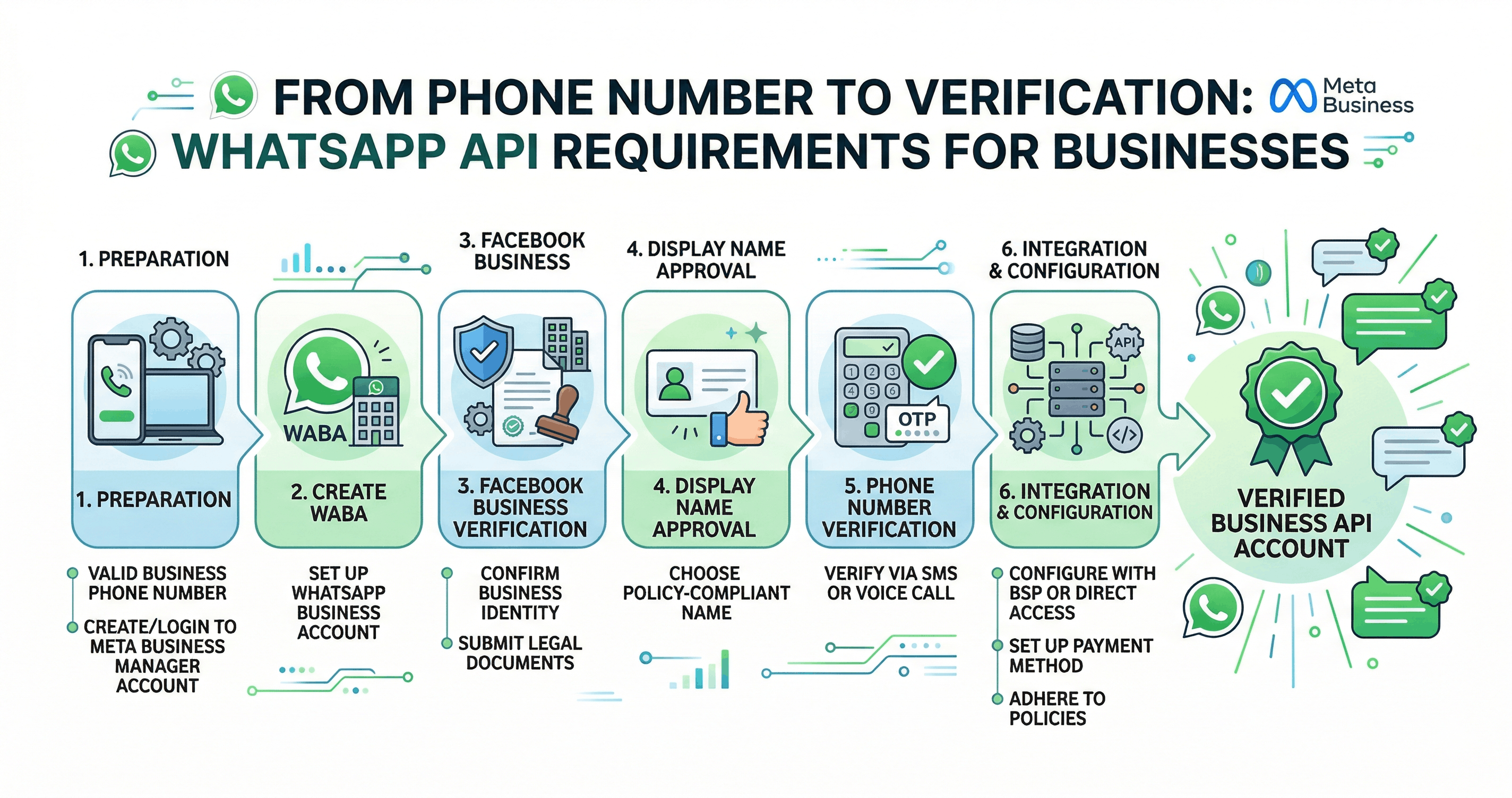
From Phone Number to Verification: WhatsApp API Requirements for Businesses
In today’s fast-paced digital landscape, businesses are constantly looking for efficient ways to communicate with their customers. One platform that has transformed business communication globally is WhatsApp. With over billions of users, it offers a direct, personal, and highly engaging channel for customer interaction. However, to unlock its full potential at scale, businesses need access to the WhatsApp Business API.
Unlike the regular app, the API is designed for medium and large businesses that want to automate messaging, integrate with CRM systems, and manage large volumes of customer interactions. But before you can start using it, there are several prerequisites you must meet—ranging from phone numbers to document verification. This guide walks you through everything you need to know.
1. Understanding WhatsApp Business API
The WhatsApp Business API is not just another messaging tool—it’s a powerful communication infrastructure. It allows businesses to:
Send notifications (order updates, OTPs, reminders)
Automate customer support
Run marketing campaigns (with user consent)
Integrate with chatbots and CRM systems
However, because of its power and reach, access to the API is strictly controlled by Meta to ensure quality, security, and user trust.
2. Phone Number Requirements
One of the most important prerequisites is having a valid phone number.
Key Conditions:
The number must be unique and not actively used on a regular WhatsApp account
It can be a mobile or landline number
It must be able to receive OTP (One-Time Password) via SMS or voice call
Why This Matters:
This number becomes your official business identity on WhatsApp. Customers will use it to interact with your brand, so it should be reliable and ideally dedicated solely to business communication.
Pro Tip:
Avoid using personal numbers. Instead, use a dedicated business number to maintain professionalism and scalability.
3. Business Documentation Requirements
To ensure only legitimate businesses use the API, proper documentation is required.
Common Documents Include:
Business registration certificate
GST certificate (for Indian businesses)
Official website
Business address proof
Company email domain
Purpose of Documentation:
Meta verifies your business to prevent spam, fraud, and misuse of the platform. This ensures that customers interacting with your business can trust your identity.
Best Practice:
Make sure your business name, website, and documents all match exactly. Even small inconsistencies can delay approval.
4. Facebook Business Manager Setup
Since WhatsApp is owned by Meta, all API access is managed through Facebook Business Manager.
Steps Involved:
Create a Facebook Business Manager account
Add your business details
Verify your business
Link your phone number
Verification Process:
Meta may ask you to upload documents or verify your domain via email or DNS. Once verified, your business gains credibility and access to advanced features.
5. Business Verification Process
Verification is one of the most critical steps in getting access to the API.
What Happens During Verification:
Meta checks your business authenticity
Confirms your legal existence
Reviews your online presence
Possible Outcomes:
✅ Approved: You can fully use the API
⏳ Pending: More information required
❌ Rejected: Due to incomplete or incorrect details
Tips to Get Approved Faster:
Use a professional website with clear branding
Ensure your business email matches your domain
Provide accurate and updated information
6. Display Name Approval
Your display name is what customers see when they receive messages from your business.
Guidelines:
Must reflect your actual business name
Should not include misleading terms
Must comply with WhatsApp policies
Examples:
✔ “thesmsbox”
❌ “Best Deals 100% Free Offers”
Why It Matters:
A clear and trustworthy name improves customer confidence and message open rates.
7. Choosing a WhatsApp Business Solution Provider (BSP)
Direct API integration can be technically complex. That’s why many businesses choose to work with BSPs.
What BSPs Do:
Simplify onboarding
Provide dashboards and automation tools
Offer customer support
Enable integrations with CRM and marketing tools
Popular BSP Options:
Twilio
WATI
Gupshup
Benefits:
Using a BSP allows you to focus on your business rather than technical setup.
8. Messaging Policies and Compliance
Before using the API, businesses must understand WhatsApp’s messaging rules.
Key Policies:
User Consent Required: You must have opt-in from users before messaging
Template Messages: Pre-approved templates are needed for outbound messages
24-Hour Rule: Free-form replies are allowed only within 24 hours of user interaction
Why Compliance Matters:
Violating policies can lead to message restrictions or account suspension.
9. WhatsApp API Approval Timeline
The setup process typically takes:
1–3 days for basic setup
3–7 days for business verification
Additional time if documents are incomplete
Factors Affecting Timeline:
Accuracy of submitted documents
Website quality
Responsiveness to verification requests
10. Common Challenges and How to Overcome Them
1. Rejected Verification
Fix inconsistencies in documents
Improve website credibility
2. Number Already in Use
Remove the number from existing WhatsApp account
3. Delayed Approval
Ensure all fields are correctly filled
Follow up via BSP support
11. Best Practices for Smooth Onboarding
Use a professional business website
Keep documents ready and accurate
Choose a reliable BSP
Ensure brand consistency across platforms
Follow WhatsApp policies strictly